Model Context Protocol for hospitality connectivity
Connect the AI tools your team already uses, Claude Desktop / Claude Code (Anthropic), Codex (ChatGPT / OpenAI), Cursor (SpaceXAI), Antigravity (Google), GitHub Copilot in VS Code (Microsoft), Replit or Devin AI directly to official NextPax knowledge. Your AI reads our docs, explains errors and suggests fixes, instantly, 24/7. The result: a much faster path to the Supply API or Distribution API, and through it to 150+ channels including Airbnb, Booking.com, Vrbo and Expedia.
An open standard that lets AI tools talk to business systems.
Model Context Protocol (MCP) is an open standard that lets AI tools connect to external knowledge and systems through one consistent interface. Launched in late 2024, it has been adopted across the industry, becoming the standard way AI tools talk to business systems, the way good API documentation became a baseline expectation a decade ago.
For hospitality connectivity, that means the AI tools your developers already work in can read official NextPax knowledge directly, instead of your team switching between documentation portals, code and support tickets.
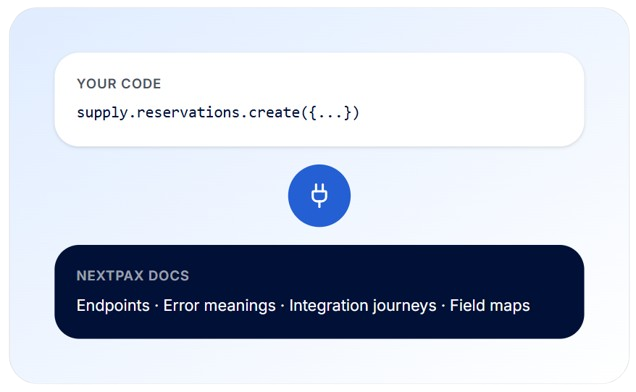
NOT A CHATBOT, A SOCKET
A socket that plugs official NextPax knowledge into your AI.
The NextPax MCP is not another chatbot. A chatbot sits between you and the system, works from its own separate knowledge base, and guesses when it doesn't know.
The MCP is a socket. It plugs official NextPax knowledge straight into the AI tools your team already uses. Your AI combines your code with our documentation,so it doesn't just quote the docs, it explains what an error means in your integration and suggests the fix in context.
WHO IT'S FOR
Serves both sides of the exchange, and your whole team once you're live.
SUPPLY SIDE
Building on the Supply API
PMS providers connecting their system to NextPax distribution
Companies building their own PMS, integrating channel connectivity from day one
DISTRIBUTION SIDE
Building on the Distribution API
Channels and OTAs integrating with NextPax to source supply: properties, content, availability and rates
ONCE YOU'RE LIVE
Your whole team
Support and operations teams, daily questions about flows and errors, without an API call or ticket
Commercial teams, matchmaking, content and pricing suggestions coming on the roadmap
WINTEGRATE FASTE
From support tickets to instant answers.
In the channel-management market, "white label" often means an embedded widget: a hosted third-party interface running inside a frame in your application. It looks integrated, but it isn't. NextPax takes the opposite approach: everything runs through the API, nothing through an embedded interface.
WITHOUT THE MCP
The slow lane
Building an API integration means digging through documentation, mapping fields, interpreting error responses, and waiting on answers across time zones when you get stuck.
Questions go back and forth by email or ticket
Error messages require someone who knows the API by heart
Momentum stalls between answers
Certification takes longer than the code itself
WITH THE NEXTPAX MCP
The fast lane
Your AI has the full NextPax knowledge base at hand, in your own environment.
Ask integration questions in plain language, get answers from official docs
Your AI reads your code plus our error meanings and suggests the fix
Step-by-step journeys guide you from first call to certification
Keep momentum: connect to the Supply API or Distribution API in a fraction of the time
CAPABILITIES
What your AI can do today.
Answer integration questions
Endpoints, fields, flows, requirements — everything in the official NextPax documentation, in plain language, inside your own AI tool.
Explain and fix errors
Your AI combines the error meaning from our docs with your actual code and suggests exactly what to change.
Guide you to certification
Endpoints, fields, flows, requirements, everything in the official NextPax documentation, in plain language, inside your own AI tool.
Work in your tools
No new dashboard, no separate portal. One install in Claude Desktop / Claude Code (Anthropic), Codex (ChatGPT / OpenAI), Cursor (SpaceXAI), Antigravity (Google), GitHub Copilot in VS Code (Microsoft), Replit, Devin AI or any MCP-capable tool your team prefers.
HOW IT FITS
An access layer on top of what NextPax already provides.
The MCP does not replace the APIs, it makes NextPax knowledge available to the AI tools working with them, on both sides of the exchange.
"Onboarding is now fully automated, distributing listings across all channels without repetitive configuration. NextPax distinguishes itself through exceptional proactivity and technical capability."
Ian Sheekey
CEO, VillaMore
"Partnering with NextPax gives us a powerful, unified pipeline to both traditional and modern distribution channels, enabling us to serve new guest segments across the globe."
Roman Pedan
CEO, Kasa
FAQ
Answers, before you ask your AI.
Common questions from teams evaluating the NextPax MCP for their integration workflow.
What is the NextPax MCP?
A Model Context Protocol server that gives AI tools direct access to official NextPax integration knowledge — documentation, API specifications, step-by-step integration journeys and error meanings — for both the Supply API and the Distribution API.
Who is the NextPax MCP for?
Both sides of the exchange: PMS providers and companies building their own PMS on the Supply API, and channels and OTAs integrating through the Distribution API. It starts with developers during integration; after go-live it also serves support, operations and commercial teams.
Is the NextPax MCP only for developers?
No. Integration is where it starts, but the MCP keeps answering after go-live: support and operations teams get instant answers on how flows work and what errors mean — without calling an API or filing a ticket.
Is the NextPax MCP a chatbot?
No. A chatbot sits between you and the system with its own separate knowledge base. The MCP plugs NextPax knowledge directly into the AI tools your team already uses, so your own AI combines your code with our documentation.
Does the MCP expose my data?
No. The MCP is read-only and serves knowledge only: documentation and integration guidance. No property data, booking data or partner data is exposed through it.
Which AI tools can connect?
Any tool that speaks the open Model Context Protocol, including Claude Desktop and Claude Code (Anthropic), Codex (ChatGPT / OpenAI), Cursor (SpaceXAI), Antigravity (Google), GitHub Copilot in VS Code (Microsoft), Replit and Devin AI. One install makes NextPax knowledge available inside the tool your team prefers.
Which channel onboarding journeys does the MCP cover?
The MCP includes step-by-step channel onboarding journeys for Booking.com, Airbnb, Vrbo, Expedia, Trip.com, Agoda, HomeToGo, Holidu, Homes & Villas by Marriott Bonvoy and the GDS through Amadeus, Sabre and Travelport. Your AI walks your team through the requirements, the steps and the common errors for each of them, alongside the Supply API and Distribution API documentation.
Is the NextPax MCP available now?
Yes. It is rolling out to NextPax partners now. Contact us to get access for your team.
Will the MCP do more than answer questions?
Yes. Today the MCP answers from official documentation. Next on the roadmap is read-only access to your own live situation, so your AI can tell you which of your properties are active on which channels, or what a specific error in your own integration means right now. After that come commercial insights such as matchmaking and content suggestions, and the ability to carry out actions for you — always asking for your explicit approval first.
GET STARTED
Our knowledge. Your AI tools.
Plug the NextPax MCP into Claude Desktop / Claude Code (Anthropic), Codex (ChatGPT / OpenAI), Cursor (SpaceXAI), Antigravity (Google), GitHub Copilot in VS Code (Microsoft), Replit or Devin AI and give your team instant answers, from first API call to daily operations.